Judged drift events, Xero export and a friendlier first visit
Outlap now runs judged drift competitions from qualifying to a live tandem bracket, exports ticket sales to Xero as a ready-to-import journal, tracks team budgets and sponsor deliverables, and walks first-time users through their role.
Most of what we build starts with the same question: what does someone actually do on the day, and what do they do the week after? This release answers that for three groups. Drift organisers get a way to run a judged competition without a whiteboard and a spreadsheet. Anyone selling tickets gets their money into their accounting software without retyping it. And everyone who lands in Outlap for the first time gets a short, dismissable nudge about what to do next.
The short version
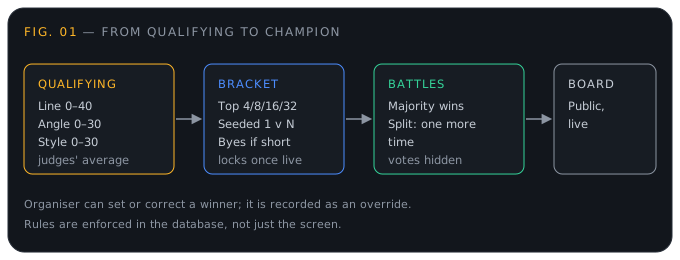
- Judged drift competitions. Judges score qualifying, the top 4, 8, 16 or 32 are seeded into a tandem bracket, and judges decide each battle live. There’s a public board that updates as it happens.
- Xero export. One balanced journal per event, ready for Xero’s manual journal import.
- First-time guides. Club owners, organisers, drivers, marshals, attendees and judges each see a short “here’s what to do” card the first time they arrive.
- Team budgets and sponsor deliverables. Plan a season, log what you spend, and prove to each sponsor what you delivered.
- A handful of organiser tools for results, protests, entry requirements, incidents and track hire (more at the end).
Running a drift competition
Drift is judged, not timed, and that changes what an event system has to do. There is no lap board to lean on. There’s a panel of people with opinions, a qualifying order that has to become a bracket, and a crowd that wants to know who just won. Until now, that lived on paper.
Setting it up
On any drift event, organisers get a Drift competition panel. You choose:
- how many qualifying runs each driver gets (one to five)
- the bracket size: top 4, 8, 16 or 32
Then you bring in entrants from the event’s entries in one click, and add walk-ons by hand with a name and a car. Drift has plenty of people who turn up on the day and want in, and now they can be.
Judges are added by their club email, so they need to be active members of the club running the event. When you add one, they get an email telling them they’ve been added, so nobody finds out by accident when it’s their turn to judge. We suggest a panel of three or five. If you add an even number, the panel warns you that a split vote sends a battle to one more time.
Scoring qualifying
Each judge sees a Score qualifying section. Pick the run and the driver who just went, enter marks for each criterion, and submit. Out of the box the criteria are line (0–40), angle (0–30) and style (0–30), so a perfect run is 100. Drivers you’ve already scored are ticked in the list, so nobody gets missed or scored twice, and you can replace your own score if you misjudged.
A run’s score is the average across all the judges. Drivers are ranked on their best run, then their next-best run as the tiebreak. The standings table updates as scores arrive, and the drivers inside the cut line are highlighted so the paddock can see who’s through.
Building the bracket
When qualifying is done, Build bracket seeds the top drivers 1 versus N (so 1 meets 16, 2 meets 15, and so on). If you’ve got fewer entrants than the bracket size, the top seeds get byes, including chained byes where that’s needed, so you never end up with an empty slot. If some runs haven’t been scored by every judge, Outlap tells you the seeding could still shift and asks if you want to go ahead anyway.
Once the first battle starts, qualifying and the bracket lock. That’s deliberate: the results shouldn’t be quietly rearranged mid-competition.
Deciding battles live
The organiser starts a battle, which puts it live in the bracket. Each judge gets a button for each driver, plus One more time. The organiser sees how many judges have decided and how many votes it takes to win.
- A battle is won by a majority of all judges, not just the ones who voted. Three judges need two votes, five need three.
- If nobody reaches a majority, the battle goes to one more time: the pair run again and the judges vote again.
- Votes stay hidden until the battle is decided. No judge can be swayed by seeing how the others voted.
- If something goes wrong, such as a judge’s connection dropping or a clear mistake, the organiser can set or correct a winner. It’s recorded as an override, so it’s visible that a human stepped in.
The rules that matter, like who can vote, what counts as a majority and when things lock, are enforced in the database rather than just in the interface. We tested seeding, byes, voting, one-more-time, overrides and locking end to end against a real Postgres. A judging system only works if people trust it, and “the screen said so” isn’t enough.
The public board
Every drift event gets a public board at /drift/<event>. It shows the bracket and the battle that’s live right now, and it updates by itself as judges decide. Put it on the big screen at the venue, or send the link to the crowd and the people who couldn’t make it. Qualifying scores and results are public along with the event.
Why it’s worth it
For organisers, the bracket is built from the qualifying scores, not retyped from a clipboard, and a disputed result has a visible trail. For judges, scoring is a few taps on a phone, and the guide explains what’s expected the first time they open it. For drivers and spectators, the question “who’s up next and who won?” has an answer anyone can look up.
Exporting ticket sales to Xero
If you sell tickets through Outlap, the money arrives via Stripe, and sooner or later someone has to turn it into entries in the books. That’s usually an evening with a spreadsheet.
In the payout report, there’s now an Export for Xero section. It produces a CSV in the format of Xero’s manual journal import: one balanced journal per event.
For an event that sold €1,000 of tickets, with €100 refunded and Outlap’s 5% fee of €50, the journal looks like this:
| Line | Account | Amount |
|---|---|---|
| Net payout to Stripe clearing | your clearing account | 850.00 |
| Outlap platform fee | your fees account | 50.00 |
| Refunds | your sales account | 100.00 |
| Ticket sales | your sales account | −1,000.00 |
It sums to zero, so Xero accepts it. Refunds are never allowed to exceed the gross, so that holds even in messy cases.
A few things worth knowing:
- Your account codes are yours. Everyone’s chart of accounts is different, so you enter your sales account, fees account, Stripe clearing account and the tax rate exactly as it’s named in your Xero. Outlap remembers them for next time (in your browser, per club).
- The payout is an estimate. It leaves out Stripe’s own processing fees, which Stripe deducts separately. That’s why the payout goes to a clearing account: you reconcile it against the actual Stripe payout when it lands, and the difference is your processing fees.
- One currency at a time. A Xero journal is in your organisation’s own currency, so only events in one currency are exported, and the screen tells you if other currencies were left out.
The value here is time and mistakes. The journal is built from the same numbers as the payout report, so the books and the report can’t disagree, and nobody retypes a refund.
A friendlier first visit
New users often don’t need more features. They need to know which of the features to touch first. So each role now gets a short guide, shown the first time they arrive at the page where it matters, which they can dismiss and which then stays dismissed.
- Club owners are walked through settings, connecting Stripe, inviting members and creating a first event.
- Organisers see the shape of an event: build the day, fill it, brief everyone, run it, and publish results.
- Drivers are pointed at adding a car, timing laps with their phone, their logbook and finding something to drive.
- Marshals learn how to pick up shifts, what happens when the track confirms them, and how to withdraw.
- Attendees see where their ticket, the briefing and their results will be.
- Drift judges get a card explaining how to score qualifying, how battle votes work, what a split vote means, and that votes stay private until a battle is decided. If a judge arrives before the organiser has set the competition up, the page says so and updates itself when scoring opens.
None of this changes what the app does. It just removes the “now what?” moment, which is the one that decides whether someone comes back.
Team budgets and sponsor deliverables
Running a team costs money, and the people who give you money want to know what they got for it.
- Season budget. Plan spend by category (entry fees, tyres, fuel, travel, accommodation, parts, crew, insurance, other) and log expenses against it, optionally tied to an event the team is entered in. You see planned against spent, with over-budget flags, and you can export it as a CSV. Currencies are never added together: a team that races in two countries sees two honest totals instead of a made-up one.
- Sponsor deliverables. Record what each sponsor was promised, and tick items off with a link to proof, such as the post, the photo or the decal on the car. Then generate a per-sponsor season report as a PDF, which makes renewal conversations a lot easier.
Both are visible to team managers only.
Also in this release
A few smaller pieces landed alongside, mostly for organisers and track operators:
- Provisional and final results, with protests, steward notices and a results log, so a result can be published quickly and finalised once protests are settled.
- Points tables per championship and per class.
- Entry requirements for insurance, medical and transponders.
- Incident evidence: photos, the people and vehicles involved, injuries, and a PDF for the insurer.
- Track hire: a quote, a deposit and an agreement.
- Circuit layouts with sectors and named corners, which feed corner-named debriefs and real live sectors.
Try it
If you run drift events, open an event and look for the Drift competition panel. If you sell tickets, open the payout report and find Export for Xero. And if you’re new, just sign in: the guide will tell you where to start.
If something here doesn’t work the way your event does, tell us. Most of this release came from asking what people were still doing by hand.